The Complete Home Office Desk Buying Guide (2026)
Quick Answer
Size and stability decide desk satisfaction more than brand: measure your space first, decide fixed vs standing second, then judge the seven specs that matter — surface material, frame stability, weight capacity, height range, motor noise, cable management, and warranty. A stable mid-range desk beats a wobbly premium-brand one every time.
Key Takeaways
Fixed, standing, corner, or compact — which desk fits your space, budget, and job. Every desk type, the 7 specs that matter, and what to avoid.
As an Amazon Associate I earn from qualifying purchases. Product prices and availability are subject to change.
Picking a desk sounds simple — you want a flat surface. Then you start shopping and suddenly you're drowning in "butcher block vs laminate," "programmable height memory vs manual crank," "IKEA Bekant vs Autonomous SmartDesk," and "do I actually need a standing desk."
This is the guide we wish someone had written when we started researching desks for WFH Lounge. We'll cover every major category, the 7 specs that actually matter, and how to avoid the $200 particleboard regret. For standing-desk-specific shopping, we also have a dedicated standing desk buying guide.
Step 1: What size do you actually need?
Before anything else, measure your room. Then measure your monitor setup. Most people shop for a desk without measuring and end up with one that's either too big (dominates the room) or too small (can't fit their actual gear).
Minimums by setup:
- Laptop only: 30" W × 18" D. You can work on a kitchen table at this size.
- Laptop + external monitor: 42" W × 20" D. Still cramped but workable.
- Single 27" monitor + keyboard + mouse: 48" W × 24" D. Comfortable, room for coffee.
- Dual 27" monitors: 60" W × 24" D. The standard for dual-screen setups.
- Ultrawide (34"+) or triple monitor: 60–72" W × 30" D. Getting into "dedicated office" territory.
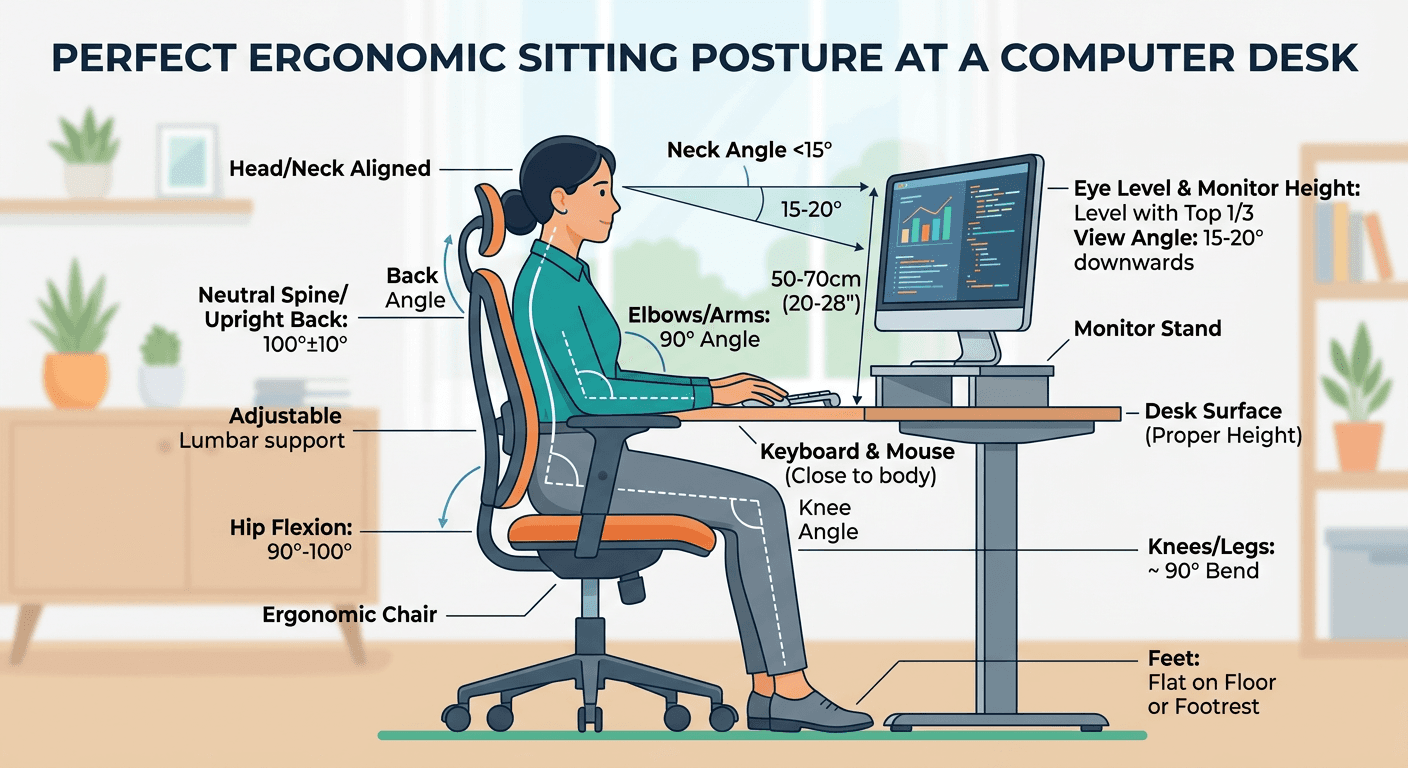
Depth is usually underrated. You want at least 24 inches of depth so the monitor can sit 20 inches from your eyes and there's still room for the keyboard in front of it. Cornell Ergonomics Lab recommends 20–40 inches of viewing distance for primary monitors.
Step 2: Fixed vs standing desk
This is the single biggest decision and the one most buyers get wrong. The short version:
Buy a standing desk if:
- You've already tried standing while working (at a friend's house, a coffee shop, etc.) and liked it
- You have lower back issues that specifically improve with alternating positions
- You're in a role (sales, customer success) where walking during calls is common
Stick with a fixed desk if:
- You've never tried standing and are just buying one because "standing desks are healthy"
- You're an engineer, writer, designer, or other role requiring deep focus — most of these workers sit during flow states and find standing breaks them
- Budget is tight (standing desks cost 2–4x fixed desks at the same quality)
Research on standing desks is mixed. A 2023 meta-analysis by Dutsch et al. found standing desks modestly reduced self-reported lower back pain but showed no measurable productivity benefit. The bigger issue: most people who buy standing desks rarely stand. r/standingdesks has hundreds of posts from owners who "use it standing 10% of the time."
If you're not sure, buy a fixed desk and add a cheap sit-stand converter later. You'll save $300+ and discover whether you actually want to stand.
Step 3: The 7 specs that actually matter
1. Surface material (medium importance)
Laminate/MDF: 90% of office desks. Durable, scratch-resistant, cheap to manufacture. Will chip if dropped. A well-made laminate desk (IKEA Bekant, Fully Jarvis laminate top) lasts 10+ years in normal use.
Butcher block / solid wood: More expensive, prettier, warmer feel. Less durable to spills and scratches — you'll need to refinish after a few years. Best for people who want the desk to look like furniture, not office equipment.
Tempered glass: Looks minimal but shows every fingerprint, can chip, and echoes audio on calls. Skip unless you specifically love the look.
Bamboo: Middle ground — renewable, warmer than laminate, less expensive than solid wood. Fully Jarvis and Uplift both offer bamboo tops around $650–$800.
Picks: For most people, a quality laminate top from Fully or Uplift is the right call. It's durable, cheap enough to replace if damaged, and looks professional.
2. Frame stability (very important)
This is where cheap desks fail. A $200 standing desk from Amazon will wobble at full standing height because the frame columns aren't thick enough to stay rigid.
Test any desk at the store or in reviews with:
- Typing test at standing height. Does the screen shake when you type aggressively?
- Reaching test. Lean your full weight on one side. Does the desk sag?
- Side-to-side sway. Push the top edge. More than a quarter-inch of movement is a problem.
Premium brands (Uplift V2, Fully Jarvis, Steelcase SOLO, Autonomous SmartDesk Pro) all have visible and invisible stabilizing features. Budget brands often don't.
3. Weight capacity (varies by use)
- Laptop + monitor only: 100 lbs is enough
- Dual monitors + speakers + peripherals: 150 lbs
- Gaming setup (multiple monitors + big PC + subwoofer): 250+ lbs
Check the weight rating on the product page. Anything under 100 lbs is a warning sign for WFH use.
4. Height range (only for standing desks)
Your ideal sitting height: elbow height when seated properly (typically 28–30 inches). Your ideal standing height: elbow height when standing (typically 40–44 inches).
Why this matters: If you're under 5'4" or over 6'2", standard 28"–48" desks might not go low or high enough for you. Confirm the full range fits your body before buying.
Premium desks (Uplift V2, Fully Jarvis) offer extended-range frames that go from 22" to 49" for very tall/short users. Budget desks often stop at 46".
5. Noise level (only for standing desks)
Electric standing desks have motors. Cheap motors are loud — loud enough to be distracting during calls. The quietest options:
- Fully Jarvis: ~45 dB (like a quiet conversation)
- Uplift V2: ~50 dB
- Autonomous SmartDesk Pro: ~55 dB
- Cheap Amazon standing desks: 65+ dB (distracting)
6. Cable management
Built-in cable trays save you $30 and an hour of DIY. Premium desks (Uplift, Fully) include them standard. Budget desks don't.
7. Warranty
This is the "tell" for build quality. A company willing to offer a 10-year warranty on a desk is confident it'll last. A 1-year warranty is a red flag.
Best warranties in the industry:
- Fully Jarvis: 15 years (full), 7 years (electronics)
- Uplift V2: 15 years
- Steelcase Migration: 12 years
- Autonomous SmartDesk Pro: 7 years
- IKEA Bekant: 10 years
Step 4: Pick your tier
Budget tier ($100–$300): IKEA Bekant, VIVO, Flexispot EG1
- IKEA Bekant ($179 for 63" × 31.5"): Fixed-height, extremely solid. The WFH default and still the best cheap fixed desk on the market.
- VIVO V000E ($140): Cheapest electric standing desk that's actually usable. Small, wobbles at full height, but functional for testing whether you'll use a standing desk.
- Flexispot EG1 ($180): Manual crank standing desk. Cheap, stable, but slow to adjust. Great for people who won't actually switch often.
Mid tier ($400–$700): Fully Jarvis, Autonomous, Uplift entry
- Fully Jarvis Bamboo ($645 for 60" × 30"): The best mid-tier standing desk. Stable, quiet, programmable memory presets, proper warranty. Gets praised on Wirecutter, r/standingdesks, and owner reviews consistently.
- Autonomous SmartDesk Core ($499): Slightly less stable than the Jarvis but cheaper. Decent for people under 6' tall.
- Uplift V2 Laminate ($649): Similar tier to Fully Jarvis. Slightly quieter motor, slightly less elegant design.
Premium tier ($800–$1500): Uplift V2 Commercial, Fully Jarvis Corner, Steelcase
- Uplift V2 Commercial ($799): Rock-solid frame, wide range, best-in-class stability. The default for buyers who want "best" without "most expensive."
- Fully Jarvis Corner ($1195): L-shaped standing desk. Rare and expensive but nothing else in the market matches it.
- Steelcase Migration ($1199): Office-grade durability, looks professional, 12-year warranty. The choice for buyers who want furniture, not "tech."
Luxury tier ($1500+)
Above $1500, you're buying style and small ergonomic refinements. Humanscale Float, Herman Miller Motia, custom reclaimed-wood desks from Etsy. Diminishing returns in terms of functionality — you're paying for looks, brand, and showroom pedigree.
Common desk-buying mistakes
1. Buying too small. Measuring is the #1 skipped step. A 48" desk looks huge until you put a 27" monitor on it and realize you have 6 inches of typing space.
The same measuring mistake happens under the desk: a chair mat should cover the area the chair actually rolls across, not the width of the desk — our office chair mats guide walks through sizing it properly.
2. Skipping the frame check. A $300 particleboard desktop on a $80 frame is worse than a $200 all-in desk from a reputable brand. The frame is what makes the desk feel solid.
3. Over-buying on "features." Memory presets, touchscreens, anti-collision sensors — all nice, none essential. The basic Fully Jarvis with no add-ons is the desk most people should buy.
4. Ignoring the warranty. Cheap desks from Amazon often come with a 90-day warranty. Good desks come with 10+ years. The difference in build quality correlates strongly with warranty length.
5. Underestimating assembly time. Most adult-level assembly takes 90–120 minutes for a first-timer. Budget an afternoon.
Frequently asked questions
IKEA Bekant or Fully Jarvis? Bekant if you're sure you want a fixed desk and want to save money. Jarvis if you want a real standing desk that you'll actually use long-term. They're different categories.
Is a desk with a drawer worth it? No. Most people end up putting a small rolling file cabinet or drawer unit under their desk regardless. Built-in drawers restrict legroom and make desk height adjustment harder.
Electric or manual crank standing desk? Electric every time. Manual crank desks are used like fixed desks within two weeks — the friction to switch makes people skip it. If budget forces a choice, buy a fixed desk and a sit-stand converter instead.
Do I need a wide ultrawide desk (72"+) for a single 34" ultrawide? No. A 60" × 30" desk fits a 34" ultrawide comfortably with peripherals and room for coffee. The 72" size is for dual ultrawides or triple-monitor setups.
What about desks with integrated USB-C hubs? Usually gimmicky. The built-in hubs tend to be low-power and proprietary. A separate USB-C hub ($60) is more flexible and cheaper. See best USB-C hubs for WFH.
How often should I replace my desk? A quality desk lasts 10–15 years easily. The frame is the part that wears out, not the top. If your top gets damaged, replace the top (~$200) not the whole desk.
Bottom line
Pick your tier based on how long you'll be working remotely:
- < 2 years: IKEA Bekant (budget fixed) or VIVO (budget standing).
- 2–5 years: Fully Jarvis Bamboo ($645). The sweet spot.
- Long-term / forever: Uplift V2 Commercial or Fully Jarvis Commercial. Build quality that outlasts your job.
For the standing-vs-fixed deeper dive, see standing desk vs sitting science. For small-apartment constraints, see best desks for small apartments and studios. For the standing-desk-only shopping, see standing desk buying guide.
Your next step
Skip to the desk picks.
Hilly Shore Labs
Editorial TeamWFH Lounge is published by Hilly Shore Labs. Every recommendation is built by synthesizing ergonomic research, manufacturer specs, expert reviews from outlets like Wirecutter, RTINGS, and The Verge, and aggregated long-term owner sentiment from thousands of verified buyers.
All product reviews are independently researched. Our recommendations are based on ergonomic guidelines, manufacturer specifications, and verified buyer sentiment. See our methodology.