WFH Setup by Job Role: Engineers, Designers & More
Quick Answer
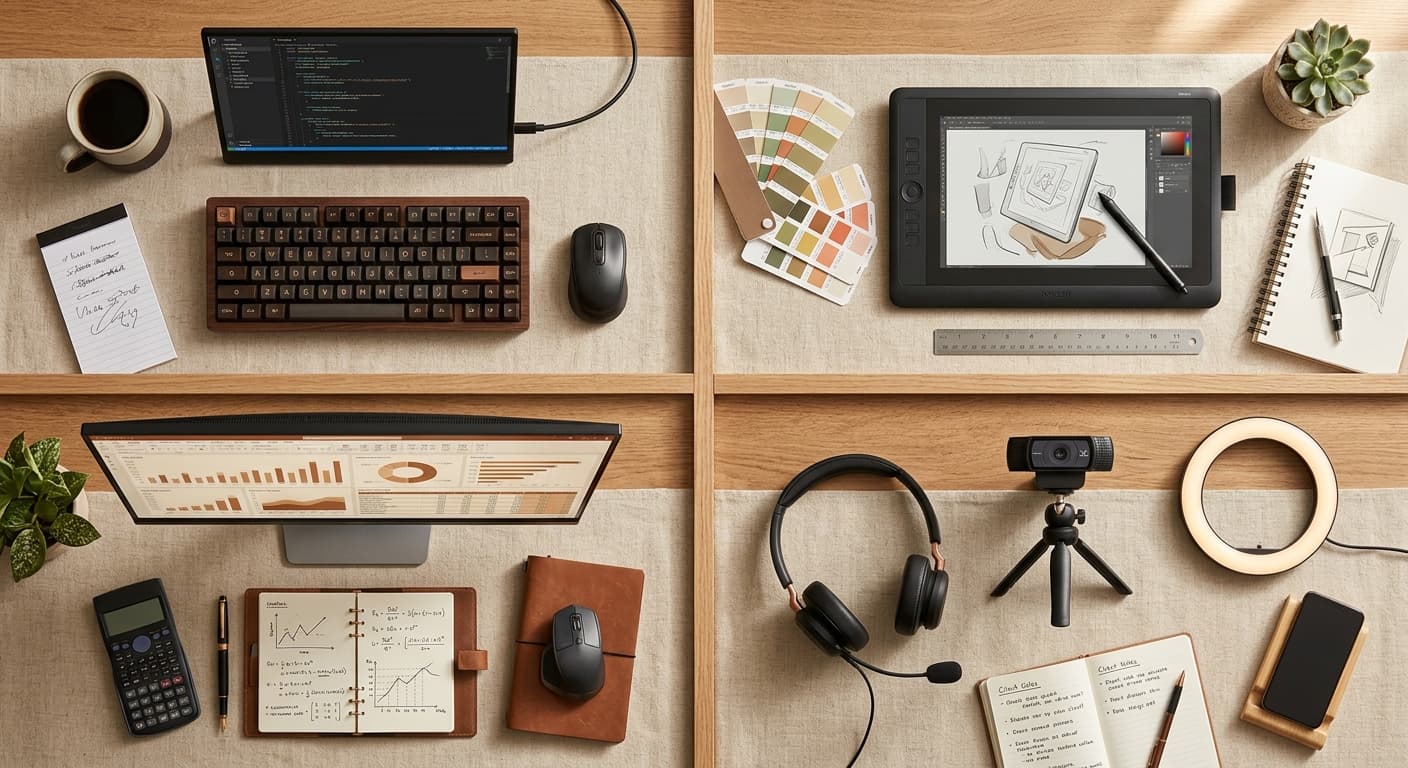
Your role decides where the money goes: engineers benefit most from screen real estate and a mechanical keyboard, designers from color-accurate panels, analysts from vertical or ultrawide space, and call-heavy roles (sales, management) from audio and lighting before anything else. Buy for the work you actually do, not the generic setup photo.
Key Takeaways
Different WFH jobs need different gear. What engineers, designers, analysts, and sales pros actually use — specific picks by role, not a generic kit.
As an Amazon Associate I earn from qualifying purchases. Product prices and availability are subject to change.
Most "WFH starter kit" guides assume everyone does the same job. They don't. A software engineer and a sales account manager have wildly different needs — different screen requirements, different audio setups, different seating tolerance.
This guide breaks down what specific roles actually need, based on surveys in r/cscareerquestions, r/UXDesign, r/datascience, and r/sales — plus the gear that consistently shows up in long-term owner feedback for people working full-time in each role. You won't find one-size-fits-all advice here.
Software engineers and developers
The workload: 6–8 hours of deep focus typing + reading code, 1–2 hours of Zoom calls or pair programming, constant context-switching between IDE, browser, terminal, and Slack.
What matters most:
- Screen real estate. Code editors + browser dev tools + terminal + Slack + Zoom all want space. Ultrawide monitors (34"+) or dual 27" setups both work. Single 27" is the minimum for professional-grade code work.
- A great keyboard. 6+ hours of typing a day. This is the one place engineers should overspend.
- Minimal audio overhead. Most engineers spend limited time on calls and don't need a pro-grade mic setup.
Recommended gear:
- Monitor: 34" ultrawide (LG 34WN80C or Dell U3425WE) OR dual 27" 1440p (LG 27QP60G).
- Keyboard: Mechanical. Keychron K2 (budget) or Kinesis Advantage 360 (ergonomic split). The Logitech MX Keys is fine if you prefer low-profile.
- Mouse: Logitech MX Master 3S for horizontal scrolling (useful for code and spreadsheets).
- Chair: Any BIFMA-certified ergonomic chair ($400+). Engineers sit more than anyone.
- Webcam: Logitech C920 is fine. You're not on camera much.
- Audio: A decent pair of wired or wireless headphones for focus + a basic headset for calls. The Jabra Evolve2 30 ($80) is the sweet spot. Don't overthink it.
- Second device consideration: A mechanical keyboard + a personal laptop for side projects means you want a KVM or Logitech Flow for seamless switching.
Skip: Ring lights, premium webcams, standing desk (most engineers hate standing while debugging).
Total budget: $1400–$2000 for a proper setup. See our best mechanical keyboards for WFH guide for keyboard deep dives.
UX designers, product designers, and creatives
The workload: Heavy use of Figma, Adobe CC, Sketch — tools that demand pixel-accurate color and lots of screen space. Frequent video calls with stakeholders. A mix of deep-focus design work and collaborative whiteboarding.
What matters most:
- Color-accurate monitor. Sub-par monitors lie to you about color, which ruins design handoffs. This is the single biggest gear differentiator for design work.
- A good tablet or stylus input. Not strictly required, but everyone who has one uses it.
- A great webcam and lighting. Designers are on camera more than engineers and are often judged on visual polish.
Recommended gear:
- Monitor: BenQ PD Series (PD2705Q or PD3220U) for color accuracy. Dell UltraSharp U2725QE if you want one-cable Thunderbolt docking with up to 140W of laptop charging.
- Second screen: A smaller 24" vertical monitor is a designer's secret weapon for asset panels, layers, and Slack.
- Keyboard: Logitech MX Keys or Apple Magic Keyboard. Designers tend to prefer low-profile.
- Mouse: Logitech MX Master 3S. Or if you work heavily in vector tools, a Wacom Intuos Pro ($280) for stylus input.
- Webcam: Logitech Brio (4K) or Insta360 Link 2. Worth the upgrade for stakeholder calls.
- Lighting: Elgato Key Light or BenQ ScreenBar Halo. This matters more for designers than most roles.
- Chair: Any ergonomic chair. The Branch or Sihoo picks from our $1000 WFH starter kit are fine.
Skip: Multi-monitor engineer setups, mechanical keyboards (most designers prefer quiet).
Total budget: $2000–$3000 for serious design work. The monitor alone often runs $500–$900.
Data analysts and data scientists
The workload: Long queries, long plots, long spreadsheets. Lots of data-heavy screens — SQL editors, Jupyter notebooks, Tableau/PowerBI dashboards, Excel spreadsheets with 50+ columns. Fewer video calls than most roles, lots of "staring at a chart" work.
What matters most:
- Horizontal screen space for wide spreadsheets and dashboards.
- A great mouse for the endless click-and-drag of data exploration.
- A comfortable chair because you sit even more than engineers.
Recommended gear:
- Monitor: 34"+ ultrawide (LG 34WN80C, Samsung S34BG85 if you can stretch to OLED) OR 27" 4K for pixel density on small text. Ultrawide is usually better for data work than dual 27" because you avoid the bezel in the middle of your spreadsheet.
- Keyboard: A good 10-key matters. Full-size keyboard with dedicated numpad (Logitech MX Keys has it; Keychron K4 if you want mechanical with numpad).
- Mouse: Logitech MX Master 3S for horizontal scroll. Consider a second "gaming mouse" (Logitech G502, $45) if you do heavy drag-select work — the faster DPI is noticeably better.
- Webcam: Logitech C920. Basic.
- Chair: Premium ergonomic chair. You sit more than almost anyone. Herman Miller Aeron (if budget allows) or a refurb.
- Lighting: Basic desk lamp is fine. You're not on camera much.
Skip: Expensive webcams, ring lights, vertical monitors (you want horizontal).
Total budget: $1500–$2500. Invest in the chair and the screen; skimp on audio and video.
Sales, account management, and customer success
The workload: 70% video calls, 20% CRM + email, 10% meeting prep. You're on camera all day. Audio quality, lighting, and webcam quality matter more than screen size.
What matters most:
- You look and sound professional on every call. This is the job.
- Audio quality, specifically. A bad mic loses you deals.
- Solid lighting setup.
- A fast dialer-friendly keyboard and dual-monitor setup for CRM + call notes.
Recommended gear:
- Webcam: Insta360 Link 2 or Logitech Brio (4K). This is non-negotiable for sales. A good webcam pays for itself in the first quarter.
- Headset / mic: A dedicated sales headset is the single biggest gear decision. Options:
- Headset route: Jabra Evolve2 65 or Poly Voyager Focus 2. Clear calls, good battery life, easy to swap calls.
- Desktop mic route: Shure MV7 + a clean pair of wired earbuds. Professional podcast-quality mic for people who'd rather not wear a headset all day.
- Lighting: Elgato Key Light ($200) or Lume Cube Broadcast Lighting Kit. This is where sales pros differentiate.
- Monitor: Dual 27" 1440p is the sweet spot. One for the call, one for CRM.
- Keyboard + mouse: Logitech MX Keys + MX Master 3S. Nothing fancy needed.
- Chair: Any ergonomic chair. You stand more than others (walking while talking).
- Standing desk: Actually useful for sales. Walking during calls keeps your energy up.
- Background: Acoustic panels or a bookshelf behind you (not a blank white wall). Background audio treatment is underrated — echoey sales calls sound unprofessional.
Skip: Mechanical keyboards (they're loud on calls), expensive mouses beyond the MX Master.
Total budget: $2000–$3500. The mic + webcam + lighting combo is what justifies the spend.
Remote managers (engineering, design, or cross-functional)
The workload: 4–6 hours of 1:1 calls and team meetings, 2–4 hours of writing (reviews, specs, strategy docs), occasional deep-dive work.
What matters most:
- Video call reliability. A dropped connection in a perf review is a bad day.
- Good audio in both directions. You need to hear your team clearly and vice versa.
- A setup that looks professional. Your team is watching.
Recommended gear:
- Monitor: 27" 4K for reading documents + video call clarity.
- Webcam: Logitech Brio or Insta360 Link 2. You're on camera more than anyone else on your team.
- Lighting: BenQ ScreenBar Halo or Elgato Key Light. Matters.
- Headset: Jabra Evolve2 75 or Poly Voyager Focus 2. Comfortable for 6+ hours of calls.
- Ethernet connection: Essential. Don't rely on WiFi for perf reviews.
- Second screen: A vertical secondary monitor for Slack and notes during calls.
Skip: Gaming gear, ultrawides, mechanical keyboards. Your job isn't typing.
Total budget: $2000–$3000, weighted toward audio, video, and lighting.
The "different for every role" principle
Generic WFH gear lists assume the "average" user. But there is no average user. An engineer who gets a ring light will never use it. A designer who skimps on monitor color accuracy will ship bad work. A sales rep who saves money on their webcam will lose deals.
The rule: Identify the 1–2 things your job demands that the average job doesn't. Spend disproportionately there. Save on everything else.
For engineers, it's keyboard + screen real estate. For designers, it's color accuracy + lighting. For analysts, it's chair + ultrawide. For sales, it's audio + video + lighting.
How to pick your role's setup
- Start with the 5 baseline items from our $1000 WFH starter kit: chair, monitor, laptop stand, keyboard, mouse.
- Replace 1–2 items with the role-specific upgrade from the sections above.
- Add the role-specific "must-have" — for sales, that's a premium webcam + headset; for designers, a color-accurate monitor + lighting; for engineers, a mechanical keyboard.
- Resist the temptation to add everything. Most generic WFH guides are aspirational. Yours should be ruthlessly practical.
Frequently asked questions
What if I do multiple roles (e.g., engineer + manager)? Use your dominant role as the baseline, then add the 1–2 items from the secondary role. A player-coach engineer would build an engineer setup (dual 27" + mechanical keyboard) and add a better webcam + lighting for 1:1s.
Is a standing desk worth it for any of these roles? Mostly only for sales. Walking during calls keeps energy up and helps your voice stay engaged. For focused roles (engineering, design, analytics), most people use standing desks sitting 95% of the time.
What about customer support roles? Similar to sales — audio and video matter most. But if your support is mostly chat-based, go with an engineer/analyst setup instead.
What's the cheapest role to set up? Engineer, believe it or not. You can get a solid engineering setup for $1400 because you can skip the expensive webcam, lighting, and audio gear. A sales setup starts closer to $2500 because the audio/video tools aren't optional.
What gear works across every role? A good chair, a 27" monitor, a Logitech MX Keys + MX Master 3S. These are the role-agnostic baseline.
Bottom line
Don't buy "the WFH starter kit" — buy your role's starter kit. The engineer needs a great keyboard. The designer needs a calibrated monitor. The analyst needs an ultrawide. The salesperson needs a broadcast-grade mic and light. Figure out what your job demands, overspend there, skimp everywhere else.
For role-agnostic foundations, see our $1000 WFH starter kit and the budget framework for a 2026 setup. For role-specific deep dives, see best mechanical keyboards for WFH, best monitors for home offices, and best headsets for Zoom calls.
Buying this setup through a business?
If you’re self-employed and expensing the build, a free Amazon Business account is worth opening before you order — business-only pricing on the same gear, and itemized invoices instead of a pile of personal receipts to reconcile later.
- Free to open — no Prime or membership required
- Business-only pricing + quantity discounts on office gear
- Itemized invoices with tax detail, so write-offs are painless at filing time
Your next step
See the full reference setups.
Hilly Shore Labs
Editorial TeamWFH Lounge is published by Hilly Shore Labs. Every recommendation is built by synthesizing ergonomic research, manufacturer specs, expert reviews from outlets like Wirecutter, RTINGS, and The Verge, and aggregated long-term owner sentiment from thousands of verified buyers.
All product reviews are independently researched. Our recommendations are based on ergonomic guidelines, manufacturer specifications, and verified buyer sentiment. See our methodology.