How to Choose an Ergonomic Mouse for Your Hand (2026)
Choose the type before the product. Measure your hand, watch your natural grip, then match the shape to where you actually feel strain: forearm twist points to a vertical mouse, shoulder-and-elbow reach points to a trackball, and no symptoms means a well-sized standard mouse moved from the elbow is genuinely fine. The research is clear that slanted and vertical mice cut forearm muscle activity versus a flat mouse, but equally clear that no shape removes the strain on its own — varying posture, alternating hands, and taking breaks do more than any single purchase. Skip the wrist-rest-while-mousing habit (it raises carpal-tunnel pressure), ignore DPI bragging, and don't treat any mouse as medical insurance against carpal tunnel.
Quick Answer
Match the mouse to your hand and grip, not to marketing. Measure your hand size, identify your grip (palm/claw/fingertip), then choose by symptom: a vertical mouse for forearm-twist strain, a trackball for shoulder/elbow reach strain, or a well-sized standard mouse moved from the elbow if you have no symptoms. Research shows slanted and vertical mice lower forearm muscle activity versus a flat mouse, but no shape removes strain on its own.
Key Takeaways
Measure your hand, find your grip, and decide between vertical, trackball, and standard mice. The decision framework before you pick a product.
As an Amazon Associate I earn from qualifying purchases. Product prices and availability are subject to change.
Most "ergonomic mouse" advice skips the step that matters: matching the mouse to your hand and your grip. A vertical mouse that fits a large palm-gripper is a cramp machine for a small-handed fingertip user. This is the framework — measure your hand, identify your grip, then choose between a vertical mouse, a trackball, or a better-shaped standard mouse. For picks once you know your category, see our best ergonomic mouse roundup or best mouse for remote work. This page is about choosing the right type first.
The honest starting point: shape matters less than marketing implies. A slanted or vertical mouse genuinely reduces forearm strain versus a flat one — but no shape eliminates strain, and ordinary mousing is not a proven cause of carpal tunnel syndrome. Fit, breaks, and a movement habit beat any single product.
The framework, condensed
- Measure first. Hand length (wrist crease to middle-finger tip) and palm width decide the size. Too small forces a claw; too large forces a stretch.
- Identify your grip — palm, claw, or fingertip. Your natural grip, not the box copy, tells you whether a tall shell or a low flat one fits.
- Vertical/trackball/standard is a symptom-driven choice, not a default upgrade. Pick by where you feel strain, not by which looks most "ergonomic."
- Wired vs. wireless is a non-issue for work. 2.4GHz latency is imperceptible outside competitive gaming. Choose on fit and battery.
Step 1: Measure Your Hand
Two numbers decide mouse size, and almost nobody checks them:
- Hand length: wrist crease to your middle-finger tip.
- Palm width: across the knuckles, excluding the thumb.
A rough working guide: hand length under ~17 cm (6.7 in) is small, ~17–19 cm is medium, over ~19 cm (7.5 in) is large. Too small pushes you into a cramped claw; too large forces a fingertip stretch. Either mismatch makes you tense — and Cornell's ergonomics group is blunt: "don't throttle your mouse." A tight grip is what tires the hand, so a mouse you can hold loosely is the goal.
If you do one thing: hold the mouse (or one a similar size) and check that your palm rests on it without your fingertips clinging to the front edge. A relaxed hand is the test, not the spec sheet.
Step 2: Identify Your Grip Style
Watch how your hand sits on a mouse. Three patterns map cleanly to shapes:
| Grip style | How it looks | Mouse shape that fits |
|---|---|---|
| Palm grip | Whole palm + fingers flat on the shell, hand relaxed | Larger, taller, full-bodied shells (incl. most vertical mice) |
| Claw grip | Palm back on the rear, fingers arched on the buttons | Medium, with a defined hump toward the back |
| Fingertip grip | Only fingertips touch; palm floats | Smaller, lighter, lower-profile mice |
A palm gripper on a tiny fingertip mouse hunches and tenses; a fingertip user on a tall vertical mouse loses fine control. There's no "best" grip — only the best match between your grip and the shell.
Step 3: Vertical, Trackball, or Standard?
Decide by where you feel strain, not by which device looks most therapeutic.
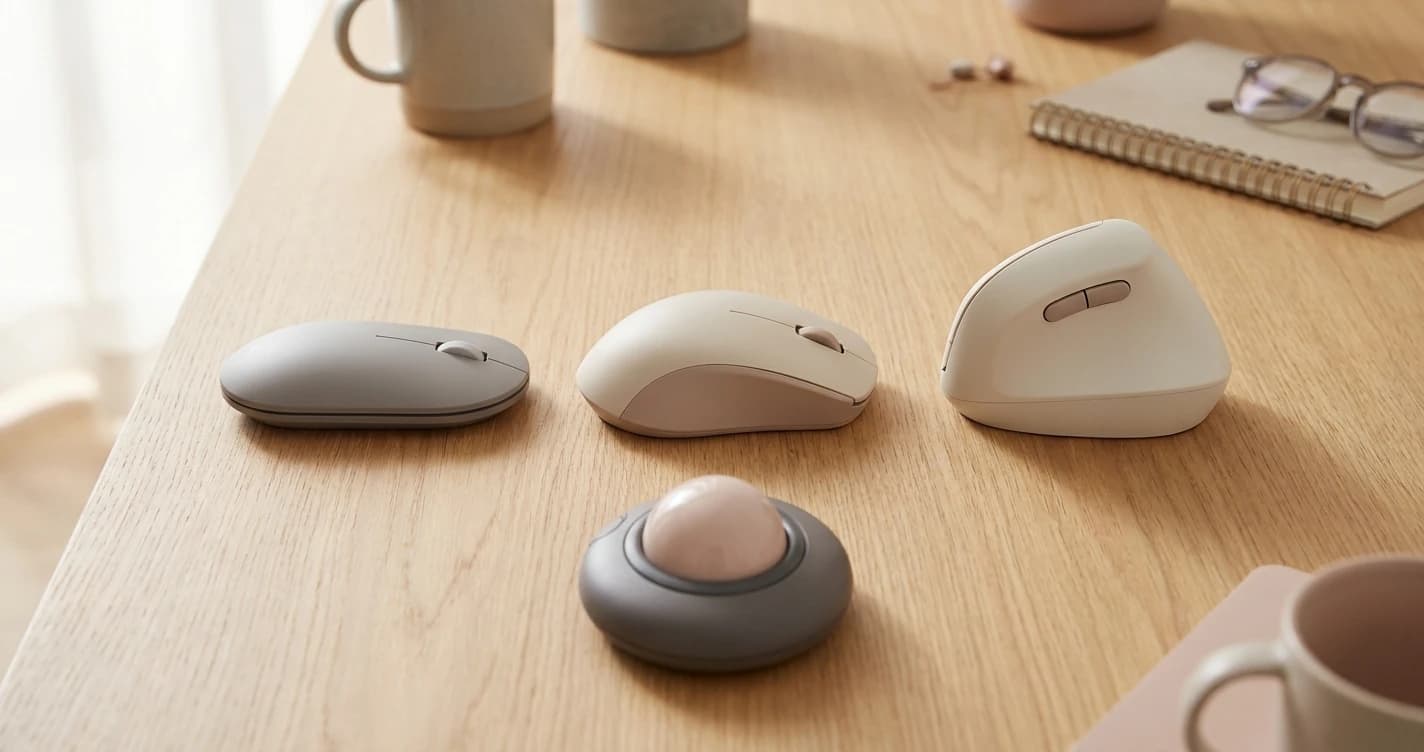
Vertical — a flat mouse forces near-full pronation (forearm rotated palm-down). A vertical mouse rotates your hand into a "handshake" to relieve that twist. A 2017 comparative study of a standard, 35°-slanted, and 65°-vertical mouse found both the slanted and vertical designs produced lower carpal extensor muscle activity than the standard, and concluded a slanted or vertical mouse "should be favoured over a standard mouse." ISO 9241 pegs the forearm's most relaxed posture at ~30° from vertical, which is why slanted shells feel less strained. Choose vertical if your strain is the forearm/wrist twist; skip it (or try a milder slant) with small hands or a fingertip grip — many vertical mice are bulky and force a palm grip.
Don't expect a cure. The same 2017 study found that regardless of shape, carpal extensor activity stayed high enough to risk fatigue over a full day. The researchers' fix wasn't a different mouse — it was alternating hands, breaks, and varying tasks. Shape buys a margin; habits buy the rest.
Trackball — the device stays put; your thumb or fingers move the ball, your arm doesn't. Choose it if your strain is in the shoulder or elbow from reaching and sweeping, or if desk space is tight. Tradeoff: a real adjustment period and slower precision for fine design work.
Standard (well-shaped) — with no symptoms, a comfortably sized standard mouse held loosely with your elbow as the pivot is fine. Cornell's guidance: "keep your wrist straight" and pivot from the elbow. A good flat mouse from the elbow beats a fancy vertical one flicked from the wrist.
Step 4: The Specs That Matter (and the One That Doesn't)
| Spec | What to actually care about |
|---|---|
| Weight | Lighter (≈70–90g) reduces all-day effort; only heavy precision work benefits from added weight. |
| DPI / sensor | Any modern optical sensor (800–3200 DPI, adjustable) is fine. Higher ≠ better — set it where small wrist motion covers your screen. |
| Buttons | A forward/back thumb button or two saves wrist travel; don't overbuy a 12-button MMO mouse for spreadsheets. |
| Wired vs. wireless | A non-issue for office work — 2.4GHz latency is imperceptible. Pick on battery/cable preference. |
The DPI myth: a "16,000 DPI gaming mouse" does nothing for ergonomics. What helps is setting DPI high enough to cover the screen with small movements so you stop sweeping your arm — a settings change, not a purchase.
What Most People Get Wrong
Three things the evidence does not support:
- "An ergonomic mouse prevents carpal tunnel." A 2015 review in Best Practice & Research: Clinical Rheumatology found the repeatable risk factors are forceful, highly repetitive hand work and vibration (assembly lines, chainsaws) — and concluded the evidence "did not demonstrate an important association with use of a computer keyboard and mouse." Buy for comfort, not as medical insurance.
- "Use a wrist rest while mousing." Cornell warns the opposite, stating that carpal-tunnel pressure doubles with a wrist rest — but Cornell cites no study for that figure, so read it as their stated position rather than a measured result. What has been measured is that pressure climbs with palm contact at all: Kubo et al. (2018), J Biomech found roughly 293 g of palm pressure enough to cross the 30 mmHg threshold. Parking your wrist also encourages flicking from the wrist instead of moving from the elbow. A palm support is for keyboard microbreaks, not for steering — our full wrist-rest evidence review walks through what the studies actually show.
- "The taller/curvier, the better." Cornell advises a mouse "as flat as possible to reduce wrist extension" if you mouse from the elbow — the right answer fits your hand and grip, not the most aggressive shape on the shelf.
What reliably helps, across every source: vary your posture, move from the elbow, take breaks. AAOS notes prolonged extreme wrist flexion or extension is what raises median-nerve pressure — so a neutral wrist and regular movement matter more than the logo on the mouse.
Putting It Together
- Measure hand length + palm width → pick a size that fits.
- Identify your grip → palm/claw/fingertip narrows the shell shape.
- Match the symptom → forearm twist = vertical; shoulder reach = trackball; no symptoms = a good standard mouse from the elbow.
- Set DPI so small movements cover the screen, and break the death-grip with breaks and alternating hands.
Once you know your category, the picks:
- →Best Ergonomic Mouse 2026vertical + ergonomic shells
- →Best Mouse for Remote Work 2026the all-rounders
- →Best Mouse Pads 2026low-friction movement
- →Best Ergonomic Accessories for WFH 2026the rest of the setup
- Or browse the full mice category
Sources & Research
- →Cornell University Ergonomics Web — 10 Tips for Using a Computer Mousegrip, elbow-pivot technique, mouse shape, the wrist-rest pressure warning.
- →Lecaroz et al. (2017), Computer Methods in Biomechanics and Biomedical Engineering — "What's the best computer mouse?"slanted/vertical mice cut carpal extensor activity vs. standard; ISO neutral posture; the breaks caveat.
- →Walker-Bone et al. (2015), Best Practice & Research: Clinical Rheumatology — "Carpal Tunnel Syndrome and Work" (PMC)force, repetition, and vibration are the established risk factors; mouse/keyboard work is not a clear cause.
- →Kubo et al. (2018), J Biomech — palm contact force vs. carpal tunnel pressuretunnel pressure rises linearly with palm contact force; ~293 g reaches the 30 mmHg threshold.
- →AAOS (OrthoInfo) — Carpal Tunnel Syndromeprolonged extreme wrist flexion/extension and repetitive use raise median-nerve pressure.
Your next step
Now pick the mouse.
Hilly Shore Labs
Editorial TeamWFH Lounge is published by Hilly Shore Labs. Every recommendation is built by synthesizing ergonomic research, manufacturer specs, expert reviews from outlets like Wirecutter, RTINGS, and The Verge, and aggregated long-term owner sentiment from thousands of verified buyers.
All product reviews are independently researched. Our recommendations are based on ergonomic guidelines, manufacturer specifications, and verified buyer sentiment. See our methodology.