Are Mechanical Keyboards Actually More Ergonomic?
"Mechanical" describes the switch; "ergonomic" describes the shape and placement — they're independent, and conflating them is the whole myth. The carpal-tunnel research is clear that wrist extension, ulnar deviation, and typing hours drive strain, while switch type isn't even a variable in the literature. Split and tented layouts can help you hold a neutral wrist, but NIOSH and OSHA both stop short of claiming they prevent injury. So buy mechanical for the feel if you want it, choose a layout for your wrists separately, and — most important and entirely free — lower your keyboard to elbow height, keep it flat, and close the flip-up feet. That's the part the evidence actually backs.
Quick Answer
Not on their own. A mechanical switch changes how a keyboard feels and sounds, not the wrist posture that actually governs strain. The ergonomic benefit people credit to "going mechanical" usually comes from a separate choice — a split or tented layout, a flatter tilt, or correct keyboard height. Occupational-health guidance (OSHA, NIOSH) ties strain to wrist extension, sideways deviation, and hours typed, none of which a switch touches. Fix keyboard height and keep it flat first; that helps more than any switch upgrade, and it's free.
Key Takeaways
Switch type is comfort, not ergonomics. What the research says actually protects your wrists for WFH — and the free fix that beats any keyboard upgrade.
As an Amazon Associate I earn from qualifying purchases. Product prices and availability are subject to change.
Short answer: not by themselves. A mechanical switch under each key changes how typing feels and sounds — it does almost nothing for the thing that actually protects your wrists, which is posture. The ergonomic gains people credit to "going mechanical" almost always come from a separate decision: a split or tented layout, a flatter tilt, or simply fixing keyboard height. This is the honest version, with what occupational-health guidance and the carpal-tunnel research actually say.
The core mix-up: "mechanical" describes the switch (a spring-loaded mechanism per key). "Ergonomic" describes the shape and placement (split, tented, flat, at the right height). They're independent. A flat mechanical board can be worse for your wrists than a well-placed membrane one.
What this comes down to
- Switch type is comfort, not ergonomics. Mechanical switches affect feel, sound, and durability — not wrist angle, which is what governs strain.
- Posture is the lever that matters. Carpal-tunnel pressure rises with wrist extension and sideways (ulnar) deviation, and with the act of typing itself — regardless of what's under the keys.
- Split and tented layouts can help, but the evidence is not conclusive. NIOSH and OSHA both say alternative keyboards may promote neutral wrists, but research has not proven they prevent injury.
- The cheapest ergonomic fix is free. Lower the keyboard to elbow height, keep it flat, and stop using the flip-up feet — that does more than any switch upgrade.
What "mechanical" actually changes
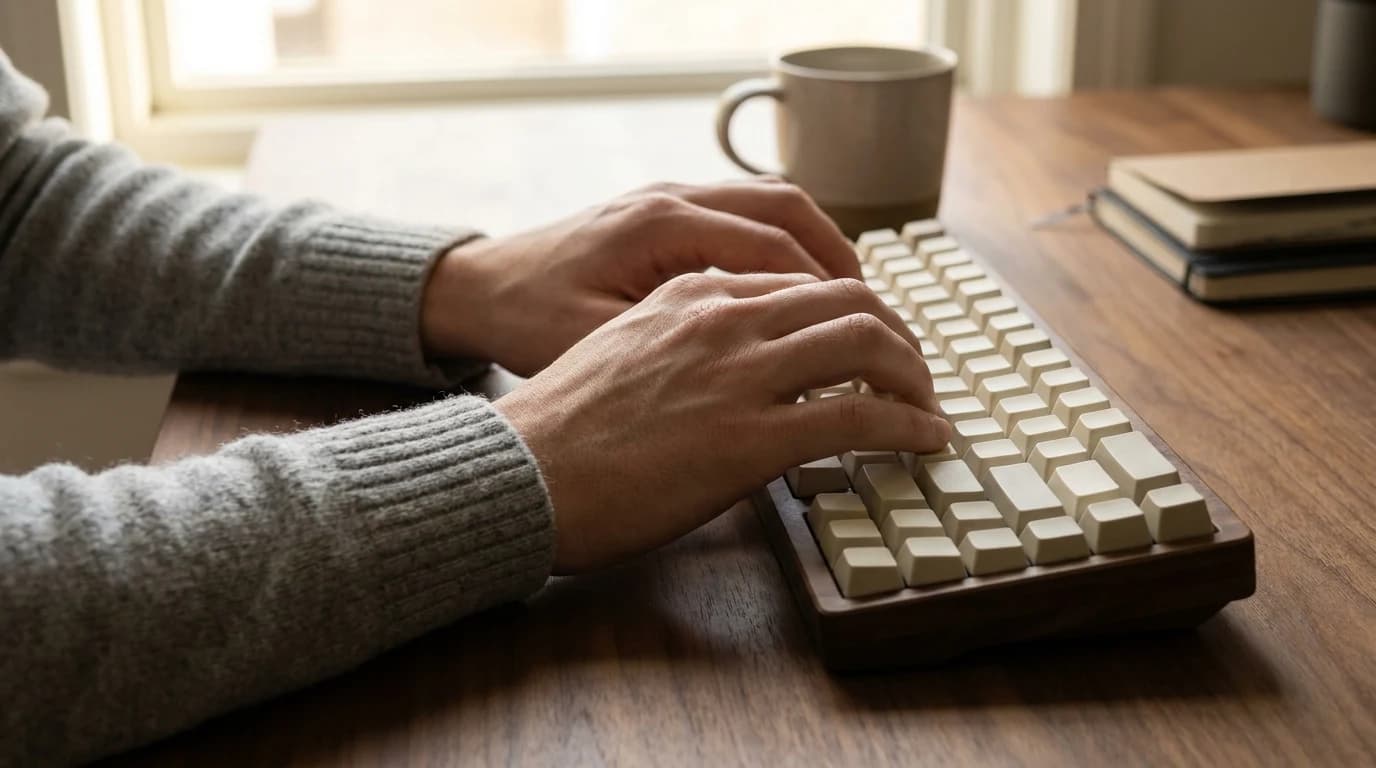
A mechanical keyboard puts an individual spring-loaded switch under every key, instead of one rubber-dome membrane sheet. That gives you tactile feedback, a defined actuation point, and a much longer lifespan. Those are real benefits — they're just typing-experience benefits.
| What it affects | Mechanical switch | Layout / placement |
|---|---|---|
| Typing feel and sound | ✅ Yes | No |
| Durability (keystroke life) | ✅ Yes | No |
| Wrist angle (extension) | No | ✅ Yes |
| Sideways wrist deviation | No | ✅ Yes |
| Forearm rotation | No | ✅ Yes |
If you love mechanical keyboards, keep loving them — for the feel. Just don't expect the switch to fix wrist pain. The fix lives in the other column. (Our mechanical vs. membrane breakdown covers the feel side in depth.)
What actually causes typing strain
The wrist, not the switch, is where the risk lives. In an in-vivo study that threaded a pressure catheter into the carpal tunnel of healthy touch typists, researchers found that wrist extension and radial/ulnar deviation each independently raised carpal-tunnel pressure, and that the act of typing itself elevated pressure relative to holding the same posture still. Pressure climbed sharply once the wrist was extended 30 degrees or more.
The same body of evidence puts a number on exposure: carpal-tunnel risk is "low or nonexistent" below about 20 hours of keyboard use per week, and several studies find elevated risk above that threshold. So the two things that move the needle are how bent your wrist is and how many hours you type — neither of which a switch touches.
A standard flat keyboard pushed back with its feet flipped up forces your wrists up and back into extension — the exact posture the carpal-tunnel research flags as worst. Closing those feet is a 2-second fix most people never make.
Where ergonomic layouts genuinely help (and the honest caveat)
This is where the "mechanical = ergonomic" myth has a grain of truth: many of the keyboards marketed to typists who care about comfort happen to be both mechanical and split/tented. The ergonomic part is the split, not the switch.
A split or tented board lets your forearms angle naturally inward and rotate slightly, reducing the sideways ulnar deviation and forearm pronation that a flat one-piece board forces. That's a sound mechanism. But the agencies that study this are careful not to oversell it.
NIOSH put it bluntly: "There is no conclusive evidence as to whether alternative keyboards can reduce the risk of musculoskeletal disorders such as carpal tunnel syndrome." OSHA echoes it — alternative keyboards "help maintain neutral wrist postures, but available research does not provide conclusive evidence that using these keyboards prevents discomfort and injury."
So: a split/tented layout is a reasonable bet if it helps you hold a neutral wrist, but it's not a guaranteed cure, and it does come with a learning curve and a tricky height requirement (tented boards often need to sit lower than a standard keyboard to keep your wrists flat). If you're shopping, look at the layout first; you can find split and low-profile options in our external keyboards guide and the full keyboards category.
The free fixes that beat any keyboard upgrade
Before spending on hardware, get the placement right — OSHA's neutral-posture guidance costs nothing:
- Drop the keyboard to elbow height. It should sit at or just below your elbows, so your forearms run roughly parallel to the floor. A keyboard that's too high makes you raise your shoulders; too low bends your wrists up.
- Keep it flat — or slightly negative. Don't prop up the back feet. OSHA notes the tilt may need adjusting to keep wrists straight, and flipping the feet up usually does the opposite.
- Wrists straight and in line with your forearms. No bending up, down, or to the side. Place the keyboard directly in front of you so your elbows stay close to your body.
- Take breaks and vary the load. Pressure builds with sustained typing; the hours matter as much as the posture. A few short breaks beat one long stretch.
A proper desk and chair height makes all of this easier to hold — that's the bigger ergonomic picture our ergonomic home-office guide walks through.
What the research does not support
It does not support "buy a mechanical keyboard to protect your wrists." Switch type isn't even a variable in the ergonomics literature — the studies are about wrist angle, deviation, forearm rotation, hours, and break patterns. It also does not support treating a split keyboard as a guaranteed fix: both NIOSH and OSHA explicitly decline to claim alternative keyboards prevent injury, and one NIOSH review found keyboard design has little measurable effect on its own.
The defensible position is narrow and boring: ergonomics is about posture and exposure, and the keyboard is one small part of a workstation. Buy mechanical for the feel if you want it. Buy split/tented if it helps you keep a neutral wrist. Fix your keyboard height and tilt regardless — that's the part the evidence is clearest about, and it's free.
A 30-second gut check
- Have wrist pain and a flat board with the feet flipped up? Close the feet and lower the keyboard first — before buying anything.
- Typing 20+ hours a week? Prioritize neutral posture and breaks; that's the exposure the research flags.
- Considering a "mechanical for ergonomics" purchase? You're buying two separate things. Decide on the layout (split/tented/flat) for your wrists and the switch for your fingers — independently.
Sources
- Occupational Safety and Health Administration — Computer Workstations eTool: Keyboards (neutral wrist posture, keyboard at elbow height, flat/neutral tilt; alternative keyboards lack conclusive injury-prevention evidence)
- National Institute for Occupational Safety and Health (CDC) — NIOSH Suggests Considerations for Alternative Keyboard Use ("no conclusive evidence" alternative keyboards reduce CTS risk; the keyboard is only one element of the workstation)
- Rempel D. et al. — Effect of Wrist Posture on Carpal Tunnel Pressure while Typing (wrist extension and ulnar deviation independently raise carpal-tunnel pressure; typing itself elevates it; ~20 h/week exposure threshold)
- University of New Hampshire Environmental Health & Safety — Keyboard Ergonomics (keyboard at or slightly below elbow height, parallel to forearms; close the back feet; neutral wrist position)
Your next step
Shop ergonomics-first — boards and beyond.
Hilly Shore Labs
Editorial TeamWFH Lounge is published by Hilly Shore Labs. Every recommendation is built by synthesizing ergonomic research, manufacturer specs, expert reviews from outlets like Wirecutter, RTINGS, and The Verge, and aggregated long-term owner sentiment from thousands of verified buyers.
All product reviews are independently researched. Our recommendations are based on ergonomic guidelines, manufacturer specifications, and verified buyer sentiment. See our methodology.