Should You Use a Vertical Monitor for Work? (2026)
A vertical monitor is a layout tool, not an upgrade. It buys you lines and costs you columns, so it pays off for tall single-column work (code, prose, chat, PDFs) and backfires on anything wide (spreadsheets, video, design). The sensible default for most people is a landscape primary with a portrait secondary, not an all-portrait setup. And there's a hard ceiling occupational-health guidance is firm on: the top of the screen must stay at or below eye level with a slightly downward gaze — which a 27-inch panel turned portrait almost always violates unless it sits low on a monitor arm or you use a smaller display. Rotating a screen does nothing for eye strain; distance, gaze angle, brightness, blinking, and breaks do the real work. Match the orientation to the shape of your task, mind the eye-level rule, and ignore the focus-hack marketing.
Quick Answer
Use a vertical (portrait) monitor only when your dominant task is tall single-column work — code, documents, chat, logs, PDFs — and keep it as a secondary screen beside a landscape primary. Skip portrait for spreadsheets, video, and design work, which are wider than they are tall. The hard constraint: the top of the rotated screen must sit at or below eye level, which a 27-inch panel turned portrait usually can't manage without a monitor arm or a smaller display.
Key Takeaways
A decision guide: which jobs a portrait monitor actually helps, the strict eye-level ceiling, and when landscape still wins.
As an Amazon Associate I earn from qualifying purchases. Product prices and availability are subject to change.
A vertical (portrait) monitor looks productive in setup photos, but for most desk jobs it's the wrong default. The honest answer is conditional: a rotated screen genuinely helps if your day is long single-column reading or writing — code, documents, chat, logs, PDFs — and it actively hurts if your work is wide spreadsheets, video, or design canvases. This is the decision framework, plus the one ergonomic rule that quietly disqualifies a lot of portrait setups.
The honest starting point: a vertical monitor is a layout tool, not an upgrade. It shows you more lines and fewer columns. If your work is tall and narrow you win; if it's wide you lose. And a tall screen only works if its top edge stays at or below eye level — which is exactly where many portrait rigs fail.
The decision in four lines
- Match the orientation to the shape of your work. Tall, single-column tasks (code, prose, chat, PDFs) suit portrait. Wide tasks (spreadsheets, timelines, video, multi-pane editing) suit landscape.
- Vertical is a secondary monitor decision. It works best as the side screen next to a landscape primary — not as your only display.
- There's a hard ceiling: the top of the screen must not sit above eye level. A 27-inch panel turned portrait is ~24 inches tall and almost always breaks this rule.
- No orientation fixes strain on its own. Distance, gaze angle, and breaks matter more than which way the panel faces.
When a vertical monitor actually helps
Rotating a screen 90 degrees trades width for height. That trade pays off only for work that is naturally a tall, narrow column.
| Your work is mostly… | Best orientation | Why |
|---|---|---|
| Code, terminals, logs | Portrait (as 2nd screen) | See 60–90 lines without scrolling |
| Long documents, writing, PDFs | Portrait | A full page fits top-to-bottom |
| Chat, email, social feeds, dashboards | Portrait | Feeds are vertical lists |
| Spreadsheets, financial models | Landscape | Columns run sideways |
| Video calls, video editing, photo work | Landscape | The content itself is 16:9 |
| Design canvases, CAD, timelines | Landscape | Horizontal workspace |
The common thread: portrait wins when the content is a vertical column and you'd otherwise be scrolling. It loses the moment your content is wider than it is tall — and most professional software (spreadsheets, video, design, browsers with side panels) assumes a landscape canvas.
Why landscape is the sensible default
There's a reason monitors ship in landscape. Human visual processing is biased toward the horizontal: studies of how people scan information displays find that the horizontal direction tends to be processed more efficiently than the vertical, an advantage rooted in visual characteristics (and modulated by reading culture).
Practical read: for scanning and comparing many items side by side, landscape has a real cognitive edge. For reading one column straight down, that edge disappears and height wins. That's the whole decision in one sentence.
So the question isn't "is vertical better?" — it's "does my dominant task read down a column, or across a row?" Answer that first, and the orientation chooses itself.
The ergonomic rule most portrait setups break
Here's the catch nobody mentions. Occupational-health guidance is consistent that the top of your screen should sit at or just below eye level, with your gaze angled slightly downward — roughly 15 degrees below horizontal — and the screen about an arm's length away.
The Canadian Centre for Occupational Health and Safety states it plainly: "When using a tall monitor or one that is oriented to the 'portrait' position, make sure that the top of the screen is not at a level higher than the operator's eye." A 27-inch monitor rotated to portrait is about 24 inches tall — so unless it sits low, you'll be tilting your head and eyes upward to read the top, which is the most fatiguing direction to look.
Rotating a large monitor often violates this rule by default. Two fixes:
- Use a smaller panel for portrait. A 24-inch screen turned vertical is far easier to keep under eye level than a 27-inch or 32-inch.
- Drop it on a real arm. A monitor arm lets you lower a portrait screen so its top stays at eye level — fixed stands usually can't go low enough. See our monitor arms guide.
The mixed setup most people actually want
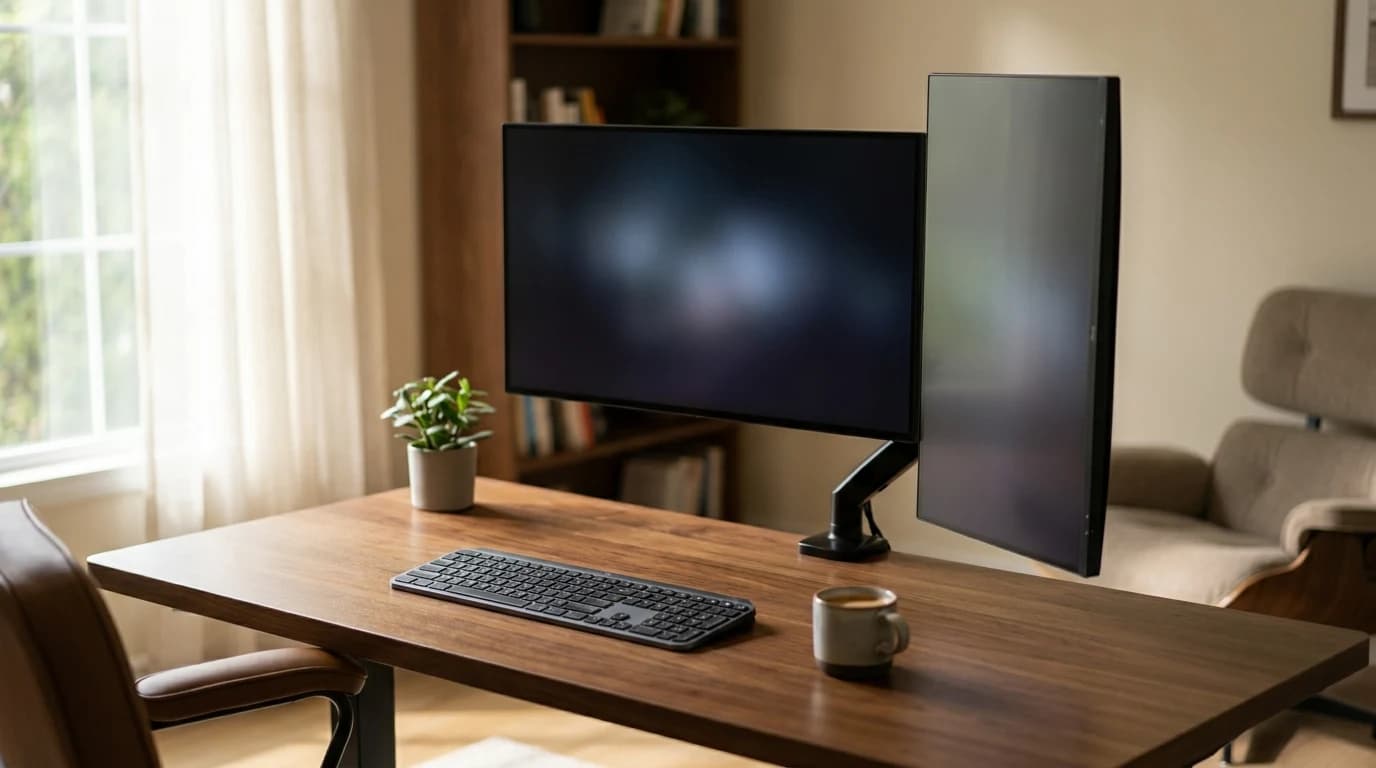
For the majority of knowledge workers, the answer isn't "vertical or horizontal" — it's one landscape primary plus one portrait secondary. Main screen in landscape for your active task, video calls, and anything wide; side screen in portrait for reference docs, chat, code, or the article you're reading from.
That layout keeps your most-used window dead ahead at the correct height and parks the tall column to the side where an occasional glance up the page isn't a problem. If you're building this, the mechanics of height-matching and arm placement are in our dual monitor setup guide and the step-by-step dual-monitor walkthrough. An ultrawide can also stand in for a dual-landscape setup if you don't want the portrait column at all.
What the research does not support
Vertical monitors are sold as a focus or productivity hack. The evidence doesn't back a blanket claim. There's no credible finding that portrait orientation makes you faster at general office work — the benefit is task-specific (less scrolling on tall content), not universal. And rotating a screen does nothing for eye strain; the American Academy of Ophthalmology's strain advice is about distance, gaze angle, brightness, blinking (screen users blink about 5–7 times a minute versus a normal ~15), and breaks — none of which improve just because the panel turned sideways. If anything, a too-tall portrait screen makes the gaze-angle problem worse.
So: rotate the screen if your work is a tall column and you can keep its top at eye level. Otherwise, the productivity gain you're picturing isn't there.
A 30-second decision
- Does your dominant task scroll down a single column? Yes → portrait helps. No → stay landscape.
- Is it your only monitor? Then keep it landscape; make portrait a second screen.
- Can the top of the rotated screen sit at or below eye level? If not (usually true for 27-inch+), use a smaller panel or a monitor arm — or skip portrait.
Sources
- Canadian Centre for Occupational Health and Safety — Office Ergonomics: Positioning the Monitor (portrait-monitor eye-level rule, ~15° viewing angle, arm's length)
- University of New Hampshire Environmental Health & Safety — Workstation Monitors (top of monitor at eye level; dual-monitor centering)
- American Academy of Ophthalmology — Computers, Digital Devices, and Eye Strain (~25 in. distance, downward gaze, blink rate, brightness)
- Tajima D. (2018), PLOS ONE — Reading habits contribute to the effects of display direction on product choice (horizontal display advantage in visual processing, modulated by reading culture)
Your next step
The monitors that rotate well.
Hilly Shore Labs
Editorial TeamWFH Lounge is published by Hilly Shore Labs. Every recommendation is built by synthesizing ergonomic research, manufacturer specs, expert reviews from outlets like Wirecutter, RTINGS, and The Verge, and aggregated long-term owner sentiment from thousands of verified buyers.
All product reviews are independently researched. Our recommendations are based on ergonomic guidelines, manufacturer specifications, and verified buyer sentiment. See our methodology.