Dual Monitors vs. an Ultrawide: Which Is Better for WFH?
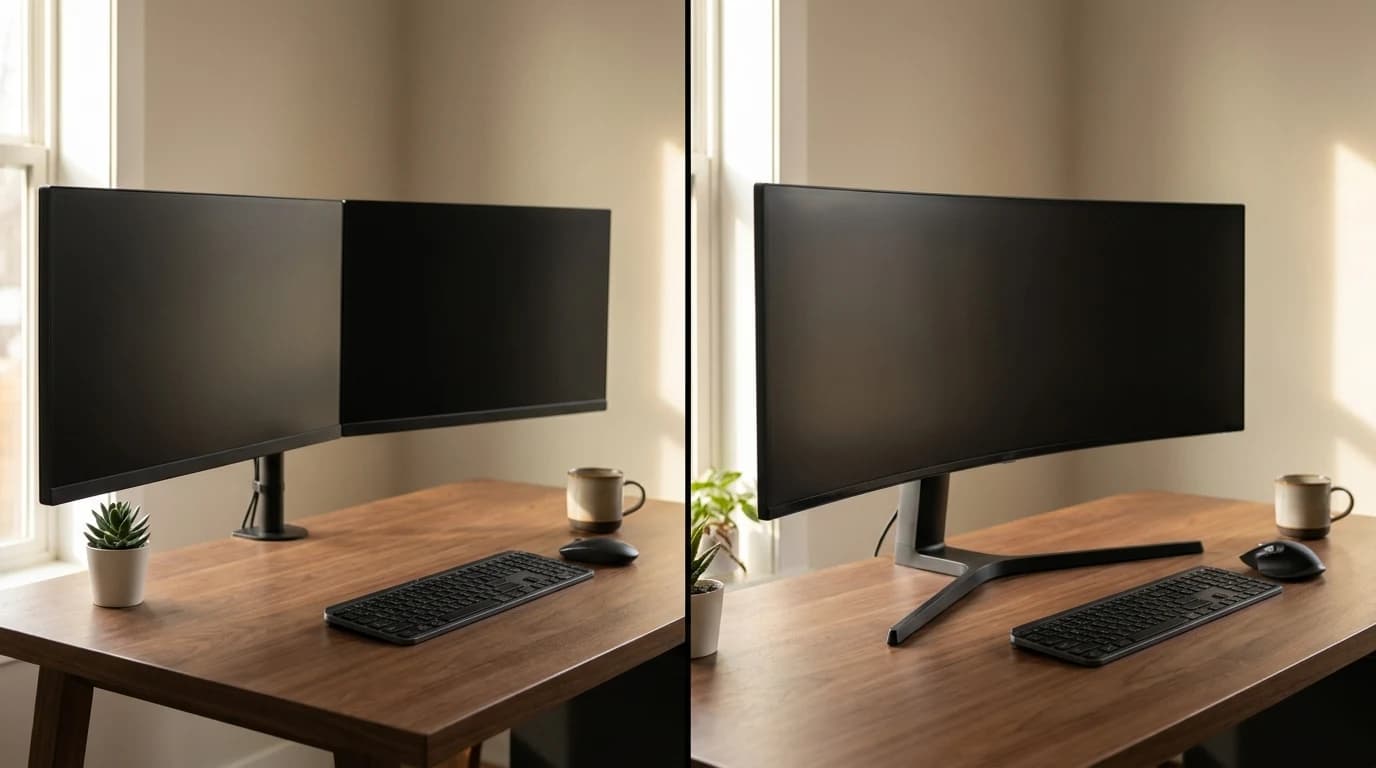
Stop comparing pixels and start comparing how you actually work. The honest answer is that two screens and one ultrawide solve different problems: dual gives you a clean task-and-reference split with a dead-center primary panel you can square to your face, while an ultrawide gives you one uninterrupted canvas with no bezel in your line of sight. The deciding factor most people skip is ergonomic: every authority that publishes monitor guidance — OSHA, CCOHS, and a peer-reviewed systematic review — lands on the same point, that the thing you look at should sit near dead-center and roughly an arm's length away. Two screens make that easy for the primary and let reference live to the side; an ultrawide makes you choose between rotating your neck to its edges or shoving it far enough back that you're squinting. So buy dual if you call and multitask all day, buy the ultrawide if you live inside one wide app — and whichever you pick, put your main work straight in front of you, not off to one side.
The Verdict
Key Takeaways
Two screens or one big curved one? The real tradeoff is workflow and your neck, not pixels. A clear decision framework for which to buy in 2026.
As an Amazon Associate I earn from qualifying purchases. Product prices and availability are subject to change.
This is the single most-asked monitor question in a home office, and almost every answer online gets it wrong by arguing about resolution and pixel counts. Those barely matter. The real decision comes down to two things: how your work is shaped, and what each option does to your neck. Get those right and the choice makes itself.
The short version: Dual monitors win if you keep a primary task in front of you and reference material to the side (calls, docs, research, coding). One ultrawide wins if you live inside a single wide app — timelines, big spreadsheets, three-pane code. The tiebreaker is ergonomics: the wider a single screen gets, the more it pushes content past the comfortable viewing zone.
What actually decides it
- The research likes both — for different reasons. A peer-reviewed systematic review found strong evidence that people prefer dual monitors and moderate evidence they improve task efficiency. It also found a catch (below).
- Dual's superpower is a real divider and a dead-center primary. You can square your main screen to your face and aim the second one at you — two surfaces, two angles.
- The ultrawide's superpower is no bezel. One continuous canvas is genuinely better for anything that spans width: video timelines, wide spreadsheets, a code editor plus terminal plus preview.
- What most people get wrong: bigger is not automatically more ergonomic. OSHA says keep your screen within ~35° of center; a 40" ultrawide's edges live well outside that unless you push it back or turn your head.
First, ignore the spec war
The internet will tell you to compare resolution, refresh rate, and panel type. For a dual vs. ultrawide decision, those are nearly irrelevant — you can buy both in the same panel quality. The question isn't "more pixels," it's "more useful pixels for the way you work." So the right first question is about your workflow, not your hardware.
A 34" ultrawide and two good 27" monitors give you a similar amount of total screen area. The difference isn't how much space — it's whether that space comes as one continuous sheet or two separately-aimable panels.
Pick dual monitors if your work is "task + reference"
Most knowledge work is one primary thing plus stuff you glance at: a doc you're writing while a research tab sits beside it; a video call front-and-center with notes off to the side; code in front and a terminal or browser alongside.
Two screens fit that shape perfectly:
- A physical divider. The bezel between screens is a feature here — it cleanly separates "what I'm doing" from "what I'm referencing," with no window-snapping gymnastics.
- A true dead-center primary. You can put your main monitor squarely in front of your nose. Every ergonomics authority asks for exactly this.
- Two aimable surfaces. Each panel can be angled toward your face independently — something a single flat or gently-curved sheet can't do.
Best for: people on calls all day, anyone who works in two apps at once, and anyone who wants their primary screen perfectly centered. See our dual monitor setup guide and how to arrange two monitors.
Pick one ultrawide if you live in a single wide app
If your work is one horizontally large thing — a video or audio timeline, a sprawling spreadsheet, a trading or monitoring dashboard, or a code layout with three panes side-by-side — the bezel that helps dual users actively hurts you. A line running down the middle of your spreadsheet is maddening.
An ultrawide gives you:
- One uninterrupted canvas. No seam, ever. Drag a window the full width without a bezel cutting through it.
- Smoother window tiling. Snap three windows across one continuous surface instead of fighting two displays' edges.
- A cleaner desk. One stand, one cable, one panel to dust.
Best for: editors, analysts, traders, and developers who want a single wide layout. Browse ultrawide picks or the monitor buying guide to size one correctly.
The part the comparisons skip: your neck
Here's the falsifiable claim worth internalizing: a wider single screen is not automatically the healthier choice. The research is unusually consistent on the geometry.
- A 2019 systematic review in Applied Ergonomics found strong evidence people prefer dual monitors and moderate evidence they boost efficiency — but also found multiple-monitor use "may result in nonneutral neck postures." More screen only helps if you're not constantly twisting toward it.
- OSHA says to put your monitor directly in front of you and no farther than 35° to the left or right, because working with your head turned to the side "loads neck muscles unevenly and increases fatigue and pain."
- CCOHS is even more specific to this decision: "When using a wide monitor, consider how the size requires the operator to rotate the neck to view the contents of the screen. It may be necessary to move the monitor further away."
The wider the single screen, the more its edges fall outside your comfortable 35° zone. Your two options become: rotate your neck repeatedly (bad), or push the screen back far enough that the edges come into the cone (good — but now the text is smaller and you need the desk depth for it). A 34" curved ultrawide at arm's length is usually fine. A flat 40"+ at a shallow desk is where people quietly develop a stiff neck.
Dual monitors dodge this trap differently: your primary screen sits dead-center, and the second one is reference you glance at, not stare into for hours. Both setups can be ergonomic — but only if you respect the same rule.
Whichever you choose, keep your main work centered and about an arm's length away, top of the screen near eye level. Our monitor positioning guide walks through the exact angles.
A 30-second decision
| If you... | Buy |
|---|---|
| Are on video calls most of the day | Dual (centered primary) |
| Switch between two apps constantly | Dual |
| Want a perfectly centered main screen | Dual |
| Live in one wide app (timeline, spreadsheet) | Ultrawide |
| Hate the bezel running down the middle | Ultrawide |
| Want one cable and a cleaner desk | Ultrawide |
| Have a shallow desk (under ~28" deep) | Dual (a big ultrawide needs setback) |
Still torn? Default to dual. The research preference leans that way, it keeps your primary centered, and two 27" screens are easy to find, cheap to replace one of, and flexible — you can run one in portrait for reading. Reach for the ultrawide when you have a specific wide-canvas workflow that the bezel genuinely ruins.
Sources
- OSHA, Computer Workstations eTool — Monitors — preferred viewing distance 20–40 inches; keep monitors within 35° left or right of center; head-turned postures load neck muscles unevenly. osha.gov
- Canadian Centre for Occupational Health and Safety (CCOHS), Office Ergonomics — Positioning the Monitor — most-used monitor goes directly in front; wide monitors require neck rotation and may need to be moved farther away; arm's-length viewing distance. ccohs.ca
- Pereira et al., Does Using Multiple Computer Monitors for Office Tasks Affect User Experience? A Systematic Review, Applied Ergonomics / Human Factors (2019), PMID 31809202 — strong evidence for dual-monitor preference, moderate evidence for efficiency gains, and possible nonneutral neck postures with multiple monitors. pubmed.ncbi.nlm.nih.gov
Your next step
Made the call? Here are the picks.
Hilly Shore Labs
Editorial TeamWFH Lounge is published by Hilly Shore Labs. Every recommendation is built by synthesizing ergonomic research, manufacturer specs, expert reviews from outlets like Wirecutter, RTINGS, and The Verge, and aggregated long-term owner sentiment from thousands of verified buyers.
All product reviews are independently researched. Our recommendations are based on ergonomic guidelines, manufacturer specifications, and verified buyer sentiment. See our methodology.